useful simple vi commands for DBAs
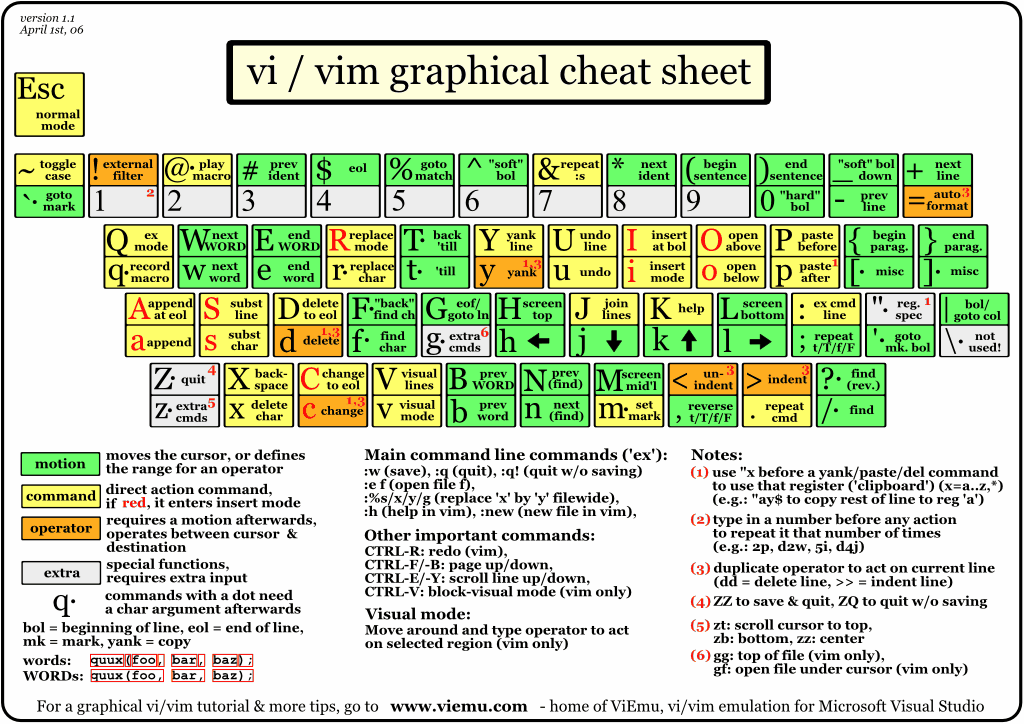
These 32 are the only commands I ever seem to use in vi:
| Command | Effect |
|---|---|
| :.= | find out the current line number |
| :1 | go to line 1 |
| Ctrl-d | page down |
| Ctrl-u | page up |
| Shift-G | go to end of file |
| i | insert text at current position |
| Shift-A | append text after end of current line |
| Shift-I | insert text before start of current line |
| Esc | get out of edit mode, back into normal vi command mode |
| dd | delete current line |
| 10dd | delete 10 lines from current line on down |
| d Shift-G | delete all lines from current line and below |
| d 1 shift-G | delete all lines from current line and above |
| . | repeat previous command |
| Shift-Y | yank (copy) current line |
| p | paste that copy into line below |
| /data | search forward for occurencies of string "data" |
| / | search forward for next occurrence of remembered search string |
| ? | search backward for next occurrence of remembered search string |
| :set ic | make searches case insensitive |
| :%s/data/index/g | replace all occurrencies of "data" with "index" |
| :%s/"//g | remove all " characters |
| :%s/$/ ;/ | append ";" to the end of every line |
| :%s/^/rem / | insert "rem " to the start of every line |
| :w | write (save) file |
| :q | quit out of vi |
| :q! | quit out of vi without saving changes |
| :wq | write (save) file and quit out of vi |
| shift-Z shift-Z | same as above ":wq" except does not write (change file modification times) if you have not made any changes. |
| :n | next file (when vi'ing a series of files, e.g. with using "vi *" at the command prompt) |
| u | undo last command |
| Shift-J | Join next line onto end of current line |
:1,$s/data/index/g replace all occurrencies of “data” with “index”
You only need use that “1,$” format if you want to specify which lines you want the search/replace to occur on. To replace all simply use:
:s/original/replacement/
The “g” on the end is not required any more either, but can still be used for legacy purposes.
“:e!” reopens the existing file for editing – the bang forces it to without saving. Can be very useful!
I also like “cw” and associated commands (eg. dw) which acts on a “word” from the cursor to the next punctuation mark. (cw stands for “change word” – deletes the word and changes the mode to insert)
In general a number before any of the commands works, so eg “10yy” will yank 10 lines and “yG” or “dG” will yank/delete to the end of file.
“r” changes current character to , “5r” changes next 5 chars to